A week configuring Ubuntu with 2 screens on an Acer Travelmate laptop

[Disclaimer: This is not a normal post in my usual style. It’s just a technical reference text. I’ve spent the whole week trying to figure out how configure my laptop and an external screen. Eventually, I got it running! So I’d like to share my config here and in some ubuntu forums]

I installed Ubuntu Feisty in my Acer Travelmate 3000 (actually 3004). The first problem I faced was the panoramic resolution of the laptop screen, 1280×800. Ubuntu tried to display 1280×1024 and the aspect ratio was squeezed. Then I looked at internet and found a recipe with 915resolution (something like “915resolution 49 1280 800 24”). Later I tried to tweak the X server configuration file, xorg.conf, to get 2 screens running (the laptop one, and an external flat panel with 1280×1024). I read on Internet several posts about people trying to configure similar hardware, and all the problems they got: nothing running at all, some screen clipping, etc. Actually I had the same problems… but finally I realized where the problem was, and I got it working! Some details as follows:

Restarting gnome and checking log
First at all, you should go to tty1 with Control+Alt+F1 and do all the editing with the root user (in this case, the best option is using “sudo -s”). To restart the gnome, the command is “/etc/init.d/gdm restart”. I ran this several times, with different configurations, and then read carefully the log file (“/var/log/Xorg.0.log”) to try to understand the errors.

915resolution
This program hacks the Bios, showing different resolutions to the X server. The most common recipe seen on Internet is to overwrite mode 49 with 1280×800 and 24 bits (normally editing the /etc/default/915resolution). But this just desconfigure some modes that (in my case) are needed for the second screen!! Don’t blindy follow Internet recipes!! So, you have to choose carefully which is the best option. Look at the original options (with “915resolution -l”), and try to overwrite an unused mode, and look at the results again with “915resolution -l”. Be sure you get all the resolutions that you need. Moreover, verify in the Xorg.0.log that the needed resolutions are operative.
In my case, I’ve chosen mode 45, 1280×800 and 32 bits. This leaves the other resolution that I need (1280×1024) unchanged. So, my /etc/default/915resolution is:

MODE=45
XRESO=1280
YRESO=800
BIT=32

etc/X11/xorg.conf
If you get the previous step working, you just need minor tweak on the X server configuration file. Just add another Device (with Screen 1), another Monitor, and another Screen. Attention: X server considers pipe A (or Screen 0) as the external one, and pipe B (Screen 1) as the built-in screen. That confused me firstly. Another thing you should add is the horizontal and vertical refresh rate for both monitors… it didn’t work if I left it empty. So finally, the interesting part of this file is:

Section "Device"
	Identifier	"915-0"
	Driver		"i810"
	BusID		"PCI:0:2:0"
    Screen      0
EndSection

Section "Device"
	Identifier	"915-1"
	Driver		"i810"
	BusID		"PCI:0:2:0"
    Screen      1
EndSection

Section "Monitor"
	Identifier	"M-0"
	Option		"DPMS"
    Option "MonitorLayout" "CRT,LFP"
    Option "Display" "CRT"
    HorizSync	30-83
	VertRefresh	56-75
EndSection

Section "Monitor"
	Identifier	"M-1"
	Option		"DPMS"
    Option  "Display" "LFP"
    HorizSync	28-64
	VertRefresh	43-60
EndSection

Section "Screen"
	Identifier	"S-0"
	Device		"915-0"
	Monitor		"M-0"
	DefaultDepth	24
	SubSection "Display"
		Depth		24
		Modes		"1280x1024" 
	EndSubSection

    SubSection "Display"
		Depth		32
		Modes		"1280x1024" 
	EndSubSection

EndSection

Section "Screen"
	Identifier	"S-1"
	Device		"915-1"
	Monitor		"M-1"
	DefaultDepth	24
	SubSection "Display"
		Depth		24
		Modes		"1280x800" "1280x1024" 
	EndSubSection
    SubSection "Display"
		Depth		32
		Modes		"1280x800" "1280x1024" 
	EndSubSection
EndSection

Section "ServerLayout"
	Identifier	"Default Layout"
	Screen		"S-0"
	Screen		"S-1" Below "S-0"
	InputDevice	"Generic Keyboard"
	InputDevice	"Configured Mouse"
	InputDevice     "stylus"	"SendCoreEvents"
	InputDevice     "cursor"	"SendCoreEvents"
	InputDevice     "eraser"	"SendCoreEvents"
EndSection

I hope this helps people to enjoy 2 screens!!

Helping your online reading

Recently I was asked about different issues regarding NLP, due to my PhD studies in that field, and I’ve started reading again about this…

Natural Language Processing is a part of the Artificial Intelligence which studies how a computer could understand natural human languages, like English. There are a lot of subjects in NLP, but in my personal case I used syntactic analyzers to detect the parts of the phrases and the relations between them. For example, to discover if a noun is modified with the surrounding words (“the blue car in the parking lot“). This information were used in a Information Retrieval system (which is something like Google or Yahoo search), to help the system to “understand” what the user is asking for. It was an interesting application of syntactic analyzers.

Visual FormattingAnother amazing use for syntactic analyzers is Visual Text Formatting.

I found an interesting article about “Visual-Syntactic Text Formatting” and a commercial website with some examples. Basically the idea is to use the syntactic information (obtained from NLP tools) to format the text in a way that is easier to read. The result seems quite effective. Surprising idea!

Barcelona doesn’t like non-ancient mathematicians

Doing some Sunday morning random surf on the net, I found somebody trying to take pictures of streets named after mathematicians in Paris. I started wondering how many streets could I find here in Barcelona with the same subject…

No Gauss, Laplace, Euler or Pointcaré… just Archimedes, Pythagoras and some more greek friends.

Obviously, with this result, I’m not even going to find any computer scientist 🙁

P.S: It would be nice to live on Turing or Dijkstra street.

“A bear in the window” problem, revisited

Some months ago, I posted a nice problem:

I walked 10 Km to the South, then I turned left, walking straight 10 Km to the East, and then I turned again, going 10 Km to the North, directly arriving to my home. Then I opened a window, and I saw a bear in the outside. Where my house is?

EarthThe easy solution was the North Pole.

The not easy solution was… there is some Earth parallel (like the red one of the picture) with a perimeter of just 10 Km, near the South Pole (actually, 89º59′49″ S), thereby my house could be 10 Km to the North of of that parallel. In this way, I walk 10 Km to the South (arriving to the magic parallel), then I walk 10 Km to the East (doing just a full turn), and finally 10 Km to the North, returning to the same initial place.

The funny thing is that we (my flatmate and I) have discovered (by mistake) another solution…
There are more places on Earth’s surface with the same property!! A lot more!! Try to find out.

You can find the answer in the first comment of this post. A clue: Harmonics.

The struggle to getting ahead

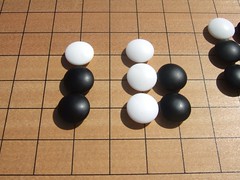
ShapeI’m among kyus (pupils) most of the time, but sometimes I’m among dans (masters). Playing with kyus is like chatting, you don’t need to be really concentrated. But if you play with a dan, you shouldn’t loose your concentration, never. Of course, this makes the situation far more interesting. You really fight!

When you are a top kyu (my personal position), just the kiai (fighting spirit) is what defines if you are going to jump the frontier, and become a dan. The feeling of “this is NOT good enough, I should find a better result“.

Every time I have the opportunity of sitting with dans, I realized how much I still have to learn. I can understand the topics, but I try to learn all the details, as much as I can. Tireless learning is the secret weapon.

Soon I’ll beat them (if they accept to play with me, of course).

Stupid robots generating the Spanish Congress’ website

The thing to speak about this week in Spain is the end of the football league. But I don’t follow it!!

Let’s restart: the thing to speak about this week in Spain, regarding the “web world”, is the new website of the Spanish Congress, www.congreso.es. This new version was worth a bit less than 200 thousand euros. And it’s probably the worst HTML I’ve ever seen… just thousands of lines of tag soup. Just try to see the source code (right click in the page, and “View Source Code”)… even if you don’t know anything about HTML, you can see some really weird things, like a thousand of lines of CSS definitions that are stupid. It’s quite impossible to do it worse!

The truth is that it’s quite clear that some kind of robot has generated all this tag soup. Humans are not in this magnitude of stupidity. Finally, all the government’s websites must follow (by law) standards and usability guidelines: I guess they haven’t any idea of what this really means.

“Welcome to Spain”… What a shame!

“Tomato plants” sorting algorithm

Yesterday I was trying to program a Heapsort algorithm in C, just as a practice to remember how C was (as rough and pure as I remembered). It’s an interesting sorting algorithm, which doesn’t use extra memory, and has a good time complexity, O(n log n). In theory it is as good as the popular Quicksort, but it does have a weird behaviour with almost ordered lists (unsorting the items and resorting them later), using more time than Quicksort uses. This is the reason for its short popularity.

This behaviour has induced me to think about similarities between computer algorithms and nature algorithms. Some algorithms have somehow an inspiration from nature, like the Bubble sort which, as its name suggests, imitates bubbles inside a liquid. Others don’t reflect nature, and this maybe is not too good.

New plants growingI have a lot of tomato plants growing on my balcony. There are too many small plants. Some of them will grow quicker, stealing the soil’s energy from others. Some will not have enough energy to develop. Natural selection. Energy movements, randomness, and quicker first states remind me of something like Simulated annealing. It’s not a honest algorithm, meaning its result is not perfect, and maybe some items get better positions that they should. But it’s an interesting path to develop…

“Part of the inhumanity of the computer is that,
once it is competently programmed and working smoothly,
it is completely honest.”
Isaac Asimov

P.S: … or maybe I must keep my mind disconnected on Sunday morning, and spend the time watching some brilliant animated shorts.

The first potato!

The first potato I’m happy to announce that I’ve got the first potato of this season!

This morning I was moving my 3 potato plants into a bigger box, and I discovered one potato ready to be eaten. I hope I’ll get more and bigger ones (I’m a greedy farmer!) in the new plant box, which is actually an old aquarium that I found in the street. It doesn’t work as aquarium (because it has leaks), so I gave it a new role. The walls were covered with paper to diminish the light going into the ground. And I set a layer of stones, then one of earth and finally one with compost. Let’s see what is going to grow there!